
Autel MaxiAP200
autel2019Auto & Vehicles
1.9432.00 Reviews
- Version
- 1.64
- Installs
- 100.00K
- Age Rating
- Everyone
Screenshots
Our Review of Autel MaxiAP200
 Analysis by Appyee
I see Autel MaxiAP200 as a phone-based way to investigate a car warning light, not a replacement for a mechanic or a guarantee that every fault will be obvious. That distinction matters: the app can make vehicle information easier to inspect, but interpreting a scan still takes care. If you like understanding what your car is reporting before deciding what to do next, it has a useful role; if you want a tool that tells you exactly how to repair every problem, I’d look elsewhere.
What a scan is useful for in everyday life
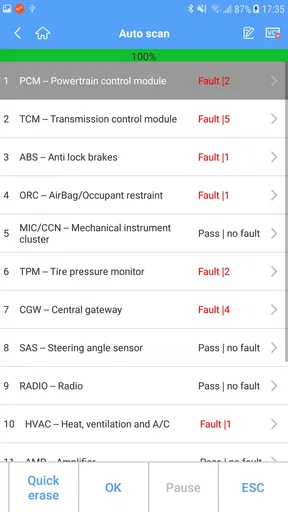
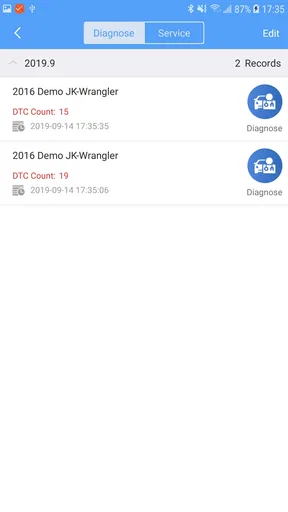
The most practical moment to use a diagnostic app is often before a problem becomes an urgent appointment. Imagine a warning light appearing on the way home. Once safely parked, you can connect the compatible scanner, read the car’s reported codes, and save the result to discuss with a repair shop. That gives you a more informed starting point than describing a dashboard light from memory, while still leaving diagnosis and repair decisions to someone qualified.
Freeze-frame information and live data serve different purposes, and it helps not to treat them as interchangeable. A stored snapshot can offer context around when a fault was recorded; live readings let you watch selected values while the vehicle is running. I’d begin with the stored code and its context, then use live data only when I have a specific question. Scrolling through readings without knowing what I’m looking for can create confusion rather than insight.
Use the report as a conversation starter
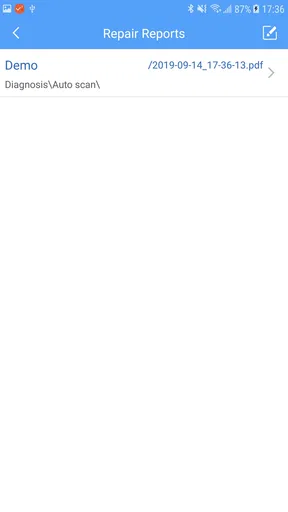
A saved scan report can help you keep a record and explain what you saw when speaking with a mechanic. I’d note the circumstances too: whether the light appeared during a cold start, after a long drive, or alongside a noticeable change in how the car behaved. That small bit of context can make a code more useful than a code alone, especially if the warning is intermittent.
There is an important trade-off when clearing a code. A cleared warning may disappear temporarily, but that does not mean the underlying cause has been fixed. I would save the report first and avoid clearing anything simply to make the dashboard look normal. If the warning returns, the earlier record can help show what changed; if the car is running poorly or the warning suggests an urgent issue, a scan should not delay professional help.
Who will get the most from it
This is best suited to a curious owner who is comfortable following a setup process and wants a clearer view of a vehicle’s reported condition. It can also suit someone who looks after more than one compatible car, provided they check vehicle support rather than assuming that a broad make list means every model and system will behave identically. Compatibility is a practical question to settle before relying on the app for a particular vehicle.
By contrast, I would skip it if I only want a quick, universal answer with no learning curve, or if I expect a phone app to identify the exact failed part every time. A basic code reader may be a simpler choice for someone who only wants a straightforward engine-code check. A repair shop is the better option when the fault is complex, safety-related, or requires hands-on testing. The app is most helpful in the space between those choices: informed observation, not a substitute for repair expertise.
Where it sits among scanner options
Compared with a traditional handheld OBD2 reader, a phone-and-Bluetooth setup can be more convenient for viewing information and keeping a digital report. A handheld unit may be preferable if you do not want to depend on a phone, app pairing, or an account setup. Neither approach automatically makes the interpretation easier; the value comes from understanding what the result can and cannot tell you.
Autel MaxiAP200 is a free Auto & Vehicles app from autel2019, with optional in-app purchases listed from $1.49 to $39.99 per item. It is rated for Everyone, has a 1.8 average from around 2.6 thousand ratings, and has been installed over 100 thousand times. Those figures make me cautious about recommending it blindly: I’d check the current compatibility and purchase details for my needs, and judge it by whether its workflow suits my own phone and car.
Its release date is September 15, 2019, and version 1.64 requires Android 7.0 or later. That gives Android users a clear baseline for device compatibility, while the app’s availability for iOS is relevant to people who use an iPhone. In either case, I would keep the phone charged, make sure Bluetooth is available, and do the first setup while parked rather than trying to learn the pairing process beside a busy road.
So, I recently got my hands on the Autel MaxiAP200 app, and let me tell you, it's been quite the ride. If you're into cars, this might just be your new best friend. It's essentially a diagnostic tool that you can carry around in your pocket. I was curious to see how it stacks up against some of the more traditional OBD2 scanners out there, and I have to say, it holds its own pretty well.
Getting Started with the Autel MaxiAP200
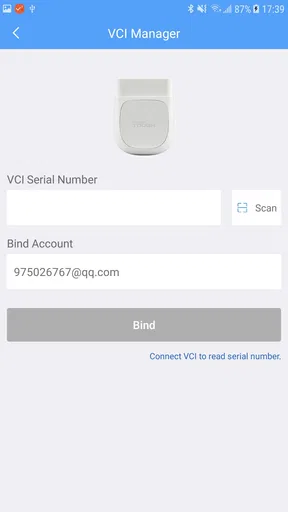
The first thing you'll notice when you download the Autel MaxiAP200 app is how easy it is to set up. You just need to connect it to the OBD2 port in your car, and you're pretty much good to go. The app pairs with the device via Bluetooth, so no more fumbling around with cables. I found the whole process to be pretty seamless, which was a relief because who really has time for complicated setups these days?
Once you've got it all set up, the app walks you through a quick registration process. It’s nice and straightforward, and before you know it, you're diving into a sea of car diagnostics. The interface is slick and user-friendly, which is always a plus in my book. No one wants to feel like they need a degree in engineering just to navigate an app, right?
Diving into the Features
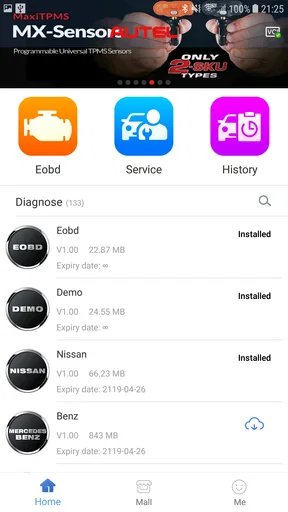
Now, let's talk about what this app can actually do. The Autel MaxiAP200 packs a punch with its features. You get access to all kinds of diagnostic data, from reading and clearing DTCs to viewing freeze frame data. I was particularly impressed by the live data feature, which lets you see what’s happening under the hood in real time. It’s like having a personal mechanic right in your pocket.
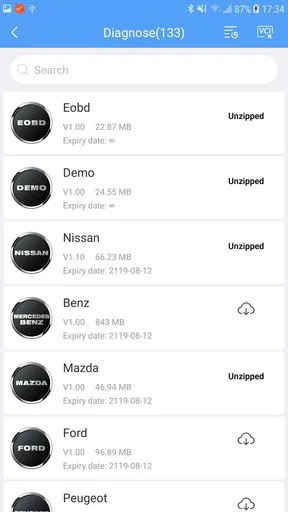
The app also supports a wide range of vehicles, which is a huge plus. Whether you're driving a Toyota or a Ford, the chances are this app has got you covered. I tested it on a couple of different models, and it worked like a charm every time. It even managed to pick up some minor issues that my old scanner missed, which was a nice surprise.
Performance and Usability
In terms of performance, the app runs smoothly on both Android and iOS. I tested it on a mid-range Android device and an iPhone, and I didn’t notice any significant differences in performance. The app didn’t lag or crash, which is always a concern with these kinds of tools. It’s clear that a lot of thought has gone into ensuring that it runs well across different devices.
One thing I really appreciated was the report function. After a scan, you can save or print the report, which is super handy if you need to show it to your mechanic or keep a record of your car's health. It’s these little touches that make the app feel polished and professional.
Final Thoughts
Overall, the Autel MaxiAP200 is a solid choice for anyone looking to keep tabs on their vehicle’s health. It’s user-friendly, packed with features, and performs well across different devices. Sure, there are other tools out there, but this one stands out for its ease of use and comprehensive diagnostics. If you’re a car enthusiast or just someone who likes to keep a close eye on their vehicle, this app is definitely worth checking out. It might just save you a trip to the mechanic.
So, there you have it. If you’re thinking about getting a diagnostic tool, give the Autel MaxiAP200 a shot. It’s got all the features you could need, and it’s a breeze to use. Plus, who doesn’t love the idea of having a car diagnostic tool that’s as portable as your smartphone?
Verdict
Strengths of Autel MaxiAP200
- User-friendly interface for quick navigation.
- Comprehensive vehicle diagnostics support.
- Affordable compared to other scanners.
- Compact design for easy portability.
- Regular software updates enhance functionality.
Limitations of Autel MaxiAP200
- Limited compatibility with some older models.
- In-app purchases required for full features.
- Occasional connectivity issues via Bluetooth.
- Requires smartphone for operation.
- No built-in battery; needs external power.
Other Releases by autel2019
View All
HT200
Auto & Vehicles2.8
Similar Picks in This Category
View All
Android Auto
Google LLC4.1

maxim — order a taxi & food
PT. SITO4.7

Штрафы ГИБДД: проверка с фото
Pays LLC – Штрафы ГИБДД4.7

Номерограм – проверка авто
Авто Ассист4.8

Дром Авто
Дром4.9

Frequently Asked Questions
What is the main function of the Autel MaxiAP200 app?
The Autel MaxiAP200 app is designed to turn your smartphone into a professional OBD2 scanner. It enables users to diagnose and troubleshoot vehicle issues by providing access to a wide range of diagnostic functions. This app supports multiple vehicle brands and offers real-time updates on vehicle performance and health.
Is the Autel MaxiAP200 app compatible with both Android and iOS devices?
Yes, the Autel MaxiAP200 app is compatible with both Android and iOS devices. Users can download the app from the Google Play Store for Android devices and the Apple App Store for iOS devices. Ensure your device meets the app's minimum system requirements for optimal performance.
What features does the Autel MaxiAP200 offer for vehicle diagnostics?
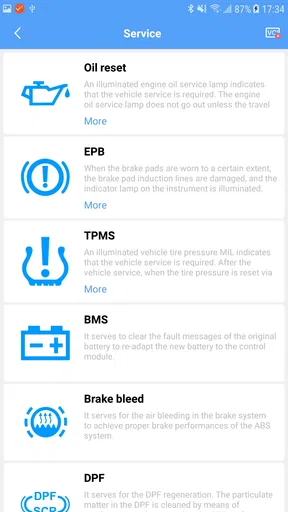
The Autel MaxiAP200 app provides a comprehensive range of diagnostic features, including reading and clearing diagnostic trouble codes (DTCs), performing emissions tests, and accessing live data streams. It also offers special functions like oil reset, EPB service, and BMS service, making it a versatile tool for vehicle maintenance.
Do I need any additional hardware to use the Autel MaxiAP200 app?
Yes, to use the Autel MaxiAP200 app, you will need the MaxiAP200 adapter, which plugs into your vehicle's OBD2 port. This adapter communicates with the app on your smartphone via Bluetooth, allowing you to perform diagnostics and access vehicle data seamlessly.
Is there a subscription fee for using the Autel MaxiAP200 app?
The Autel MaxiAP200 app itself is free to download, but users need to purchase the MaxiAP200 adapter. The app offers one free vehicle brand for diagnostics, with additional brands available for purchase. This allows users to customize their app experience based on their vehicle needs.
